To make all Linked Smart Objects update automatically every time a document is opened, follow these steps:
Open a document that contains linked smart objects.
Create a new action in the Actions panel.

- Enter any name and click Record.

In the Layers panel, right-click a smart object and select "Update All Modified Content" from the context menu.
Stop action recording (the left square icon).
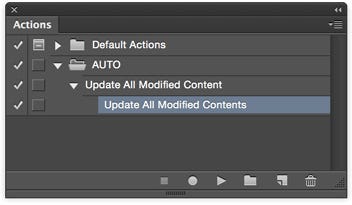
As shown above, your action should contain only one step: "Update All Modified Contents". If there are extra steps, drag them to the trash icon (on the right).
- Open Script Events Manager (`File -> Scripts -> Script Events Manager`).

7.1) Enable the top checkbox. 7.2) In "Photoshop Event", choose "Open Document". 7.3) At the bottom, select the action you just recorded (first dropdown: action set, second dropdown: action name). 7.4) Click "Add". 7.5) Click "Done".
That's it.
Now, when opening any document, Photoshop will try to auto-update all linked smart objects.
Update!
I also wrote a script that works better than an action and does not throw errors when files contain no smart objects.