Goals:
- Expand editor capabilities by moving from a flat list to unlimited nesting;
- Introduce a new Container element (similar to Figma Frame) with its own properties;
- Rebuild the layers panel UI/UX to make it more compact, clearer, and closer to professional tools.
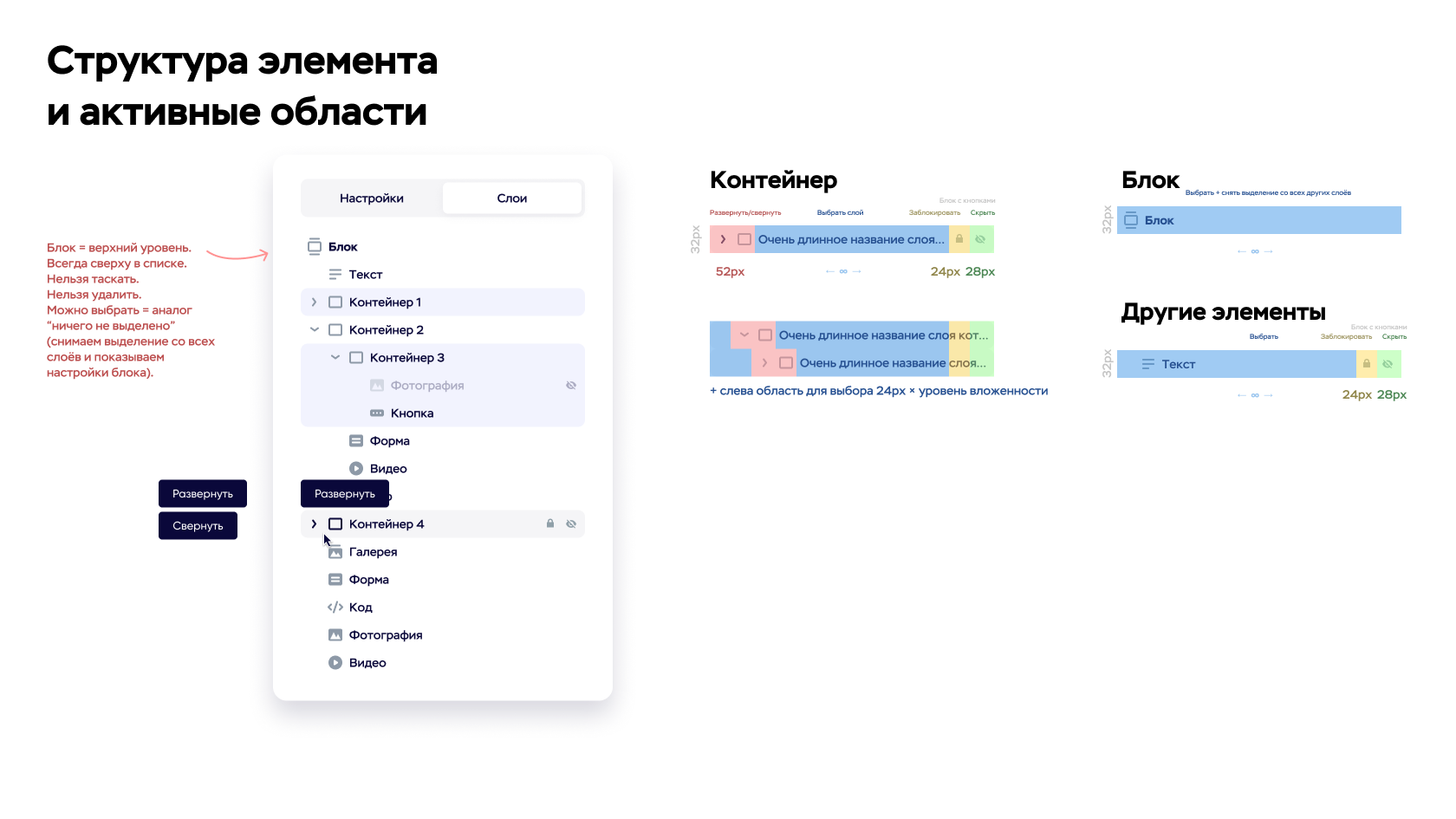


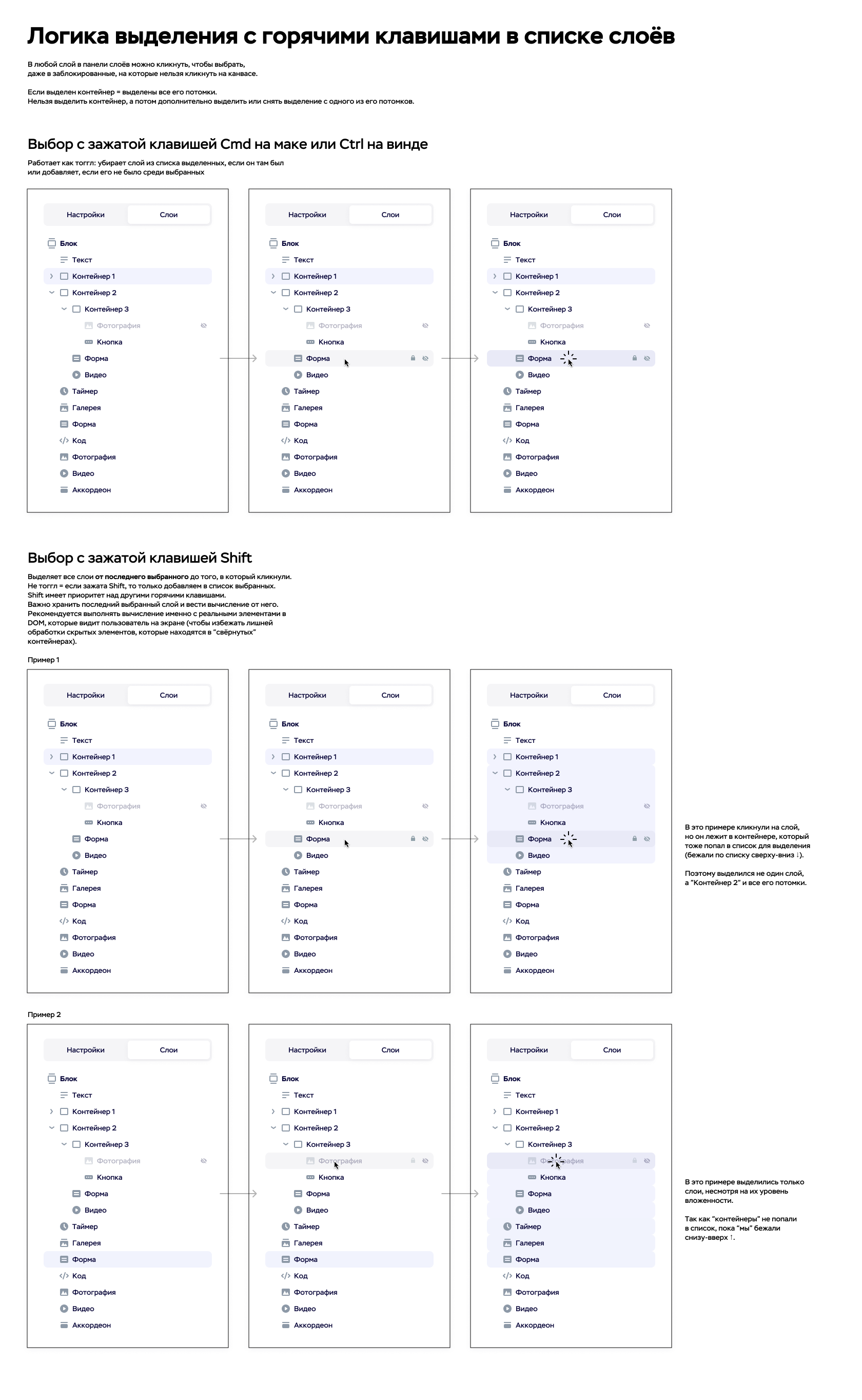

Short summary: we moved from one-level grouping to a full layer hierarchy, added a Container (Frame-like element), and redesigned the sidebar list. As a result, the editor became much more suitable for professional users: complex structures became easier to build, tree navigation became faster, and truly custom layouts became practical.
Context
Craftum is a website builder with a visual editor where users build pages from blocks and elements, configure styles, grids, positioning, animation, and publish production-ready websites.
Over time, a more advanced audience entered the product: freelancers, designers, and marketers. To attract and retain them, the editor needed more freedom: not only predefined blocks, but also fully custom structures.
At that point, the editor had a layers panel, but in practice it was a flat list. There was no true nesting: users could group elements, but groups had almost no properties and did not solve the core problem of navigation and management of complex structures.
The limitations became obvious as soon as users tried to build anything more complex than a basic landing page: dozens of layers, hard-to-scan trees, difficult selection, and awkward workarounds for common patterns like wrapping content into sections with background and padding.
The redesign goal was to align with familiar workflows from Figma, Framer, and Webflow: unlimited nesting, container-based structure, and a panel that supports daily work with large trees.
Process
I started in two directions: collecting user pain points and common scenarios where the flat list failed, and studying mature hierarchy patterns in professional tools.
After research, I documented core requirements:
- The hierarchy must be unlimited (nesting inside nesting with no artificial ceiling).
- We needed a structural element that behaves like a real object with properties, not a pseudo-group.
- The panel had to support core daily actions: fast move operations, collapsing branches, and clear structure/state indicators.
New Element: Container
The key decision was introducing a new Container element - analogous to Figma Frame. It solved two issues at once: predictable structure and independent styling/behavior properties missing in old groups.
The container received its own settings: padding, background, border, radii, and more. This enabled clean section/card composition, deeper nesting, and removed the need for extra technical layers created only for wrappers and spacing.
Containers also opened the path to the next step: CSS flexbox-based layout (similar to Figma Auto Layout) and relative sizing/spacing units (percent, em, rem). Before that, users mostly relied on absolute px values and manual breakpoint-by-breakpoint adjustments.
Unlimited Nesting
I then redesigned the tree operations and hierarchy rules:
- nest an element into a container or another layer;
- promote an element one level up;
- move an entire branch as a unit;
- preserve expected selection behavior between canvas and tree.
A careful migration strategy was essential: at first, legacy groups remained for existing projects to avoid breaking old content. Later, we migrated groups into containers and expanded their capabilities.
Layers Panel Redesign
In parallel with the data model, I redesigned the sidebar panel for dense, professional usage with large trees. The main balance target was information density vs readability: easy scanning without excessive vertical bloat.
Implementation went in two phases: first the panel redesign, then the Container element and tree logic. Total development time was three weeks by one senior frontend engineer. We worked closely with frequent syncs and scenario-based reviews.
Result
The editor received a full hierarchy model and a new foundational building block - Container. Users could create complex structures without hacks: nesting became predictable, wrapping content into sections/cards became straightforward, and grouped element control improved through container properties.
The layers panel became more compact and practical for daily work: faster orientation, faster element lookup, and better structural control.
Based on feedback from advanced users, the speed of creating complex/creative layouts increased by 2-5x, and the product was much less frequently described as too primitive.